

1. FileZilla FTP transfer client
FileZilla is a fast, reliable, cross-platform, free and open source FTP transfer software with multiple features and a straightforward interface.FileZilla supports FTP, FTP over SSL/TLS, SSH SFTP (File Transfer Protocol) and many other protocols with high compatibility and stable transfer. With powerful site manager and transfer queue management, support for remote search files, support for creating multiple tags at the same time, the main features of free open source.
![Picture[1]-Windows/Macos system three commonly used FTP transfer software-Small seven notes](https://www.snswm.com/wp-content/uploads/2024/07/d2b5ca33bd20240720185202.png)
easy-to-use
It's simpler than any other FTP software
Multi-protocol support
Support for FTP, FTPS, SFTP and other file transfer network protocols
multilingual
Multi-language support, perfect support for Simplified Chinese
multi-tabbed interface
Support for creating multiple tags at the same time
Finding files remotely
Supports remote file search function
Site Manager
With powerful site manager and transmission queue management
2、XTerminal terminal emulator/SSH/SFTP client
![Picture [2]-Windows/Macos system three commonly used FTP transfer software-Small seven notes](https://www.snswm.com/wp-content/uploads/2024/07/d2b5ca33bd20240720185250-1024x643.png)
The best online SSH, SFTP tools, open anytime, anywhere, support for online editing of files, status monitoring, support for private deployment lines, give you the maximum data security.
Customized layout, easy-to-operate documentation and real-time system monitoring
Fully customizable layouts to meet individual needs
Graphical real-time monitoring, clear grasp of the system status
No need to learn, easy to edit, delete, add, upload download, move files
3、Xftp transfer client
Xftp is a powerful FTP transfer client software which is mainly used for file transfer and management between local computer and remote server. The software has a simple, intuitive and easy-to-use interface and supports multiple sessions and multiple protocols (e.g. SFTP, FTP, SCP).Xftp 7 also has many useful features such as remote editing, batch file transfer, folder synchronization and file permission control. In addition, it supports security features such as encrypted transfer and public key authentication to ensure the security of data transfer.
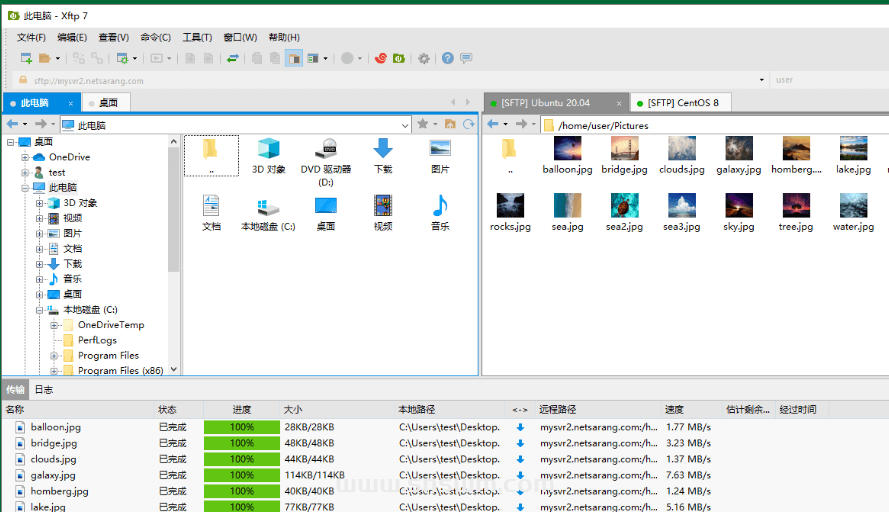
Easy to transfer
Drag and drop files between remote hosts and view progress in real time. You can manage queues and specify rules.
Speed of rapid transfer
Synchronous transfers maximize bandwidth, and FXP support can greatly reduce transfer times.
reschedule
Sends and receives files according to a user-defined time schedule.
enhanced synchronization
Compare, contrast and synchronize with one click.
Image thumbnail preview
View thumbnail previews of image files directly inside Xftp.
Quick File Search
Easily find/filter out files and folders in directories
tabbed interface
The intuitive tabbed interface allows you to manage multiple sessions at once and rearrange them with drag and drop.
synchronized view
Folder navigation can be kept in sync between the two servers to save time and keep things tidy.
Windows context menu
Xftp supports seamless integration with Windows context menus and is ready to be edited with your favorite text editor.
Inheritable session properties
Set session properties at the session folder level and have the sessions under it inherit those properties.
Integrated support
Transfer types, authentication methods, jump host agents, custom text editors, and more.
Recent Sessions List
Easily check and connect to recently linked servers
![Picture [4]-Windows/Macos system three commonly used FTP transfer software-Small seven notes](https://www.snswm.com/wp-content/uploads/2024/07/d2b5ca33bd20240720191214.png)
![[Black Apple Installation Tutorial] macOS 12 Monterey Original OC Boot - Xiaoqi Notes](https://www.snswm.com/wp-content/uploads/2022/05/image-13-500x350.png)


![[Black Apple Installation Tutorial] macOS 12 Monterey Original OC Boot - Xiaoqi Notes](https://www.snswm.com/wp-content/uploads/2022/05/image-13.png)


No comments